
Introduction: The CMS Landscape Is Shifting Toward the Edge
If you've ever waited eight seconds for a WordPress site to load on your phone while standing in Westlands with three bars of signal, you already understand the problem. Traditional CMS platforms were built for a world where servers sat in data centers in Virginia or Frankfurt, and users were expected to wait patiently while their requests traveled thousands of kilometers. That world doesn't work for Kenya — or most of Africa, frankly.
So, what is EmDash CMS, and why should you care? It's a new open-source CMS built on Cloudflare Workers and the Astro framework that flips the entire hosting model on its head. Instead of your website living on a single server somewhere in Europe, it runs across Cloudflare's global network — including data centers right here in Nairobi and Mombasa. The result? Pages that load almost instantly, hosting costs that can literally be zero, and a developer experience that feels modern rather than stuck in 2009.
I've been building websites since 2011 — started while studying Electrical and Electronics Engineering at the Technical University of Kenya, where my classmates thought I was crazy for spending more time on PHP than power systems. Over those 14 years, I've watched the CMS landscape evolve from static HTML pages to WordPress domination to the current headless CMS explosion. And now we're entering what I believe is the next phase: edge-first content management.
In this post, I'll break down exactly what EmDash is, how its technology stack works, who it's built for, and why Kenyan developers and business owners should have it on their radar. Whether you're a developer looking for a modern alternative to WordPress templates or a business owner trying to understand the options, this guide covers everything you need to know.
Disclosure: I've reviewed EmDash's open-source codebase and tested the stack locally. The setup commands and observations in this post are based on hands-on evaluation of the project files, not solely documentation reading.
What Is EmDash CMS? A Complete Overview
Let me break this down simply. EmDash is an open-source content management system written entirely in TypeScript, built on the Astro framework, and deployed on Cloudflare Workers. It uses Cloudflare D1 (a serverless SQLite database) for storing content and Cloudflare R2 (object storage) for handling media files like images and documents. The entire thing is available on GitHub for anyone to use, modify, and deploy.
Now, what does that actually mean in plain English?
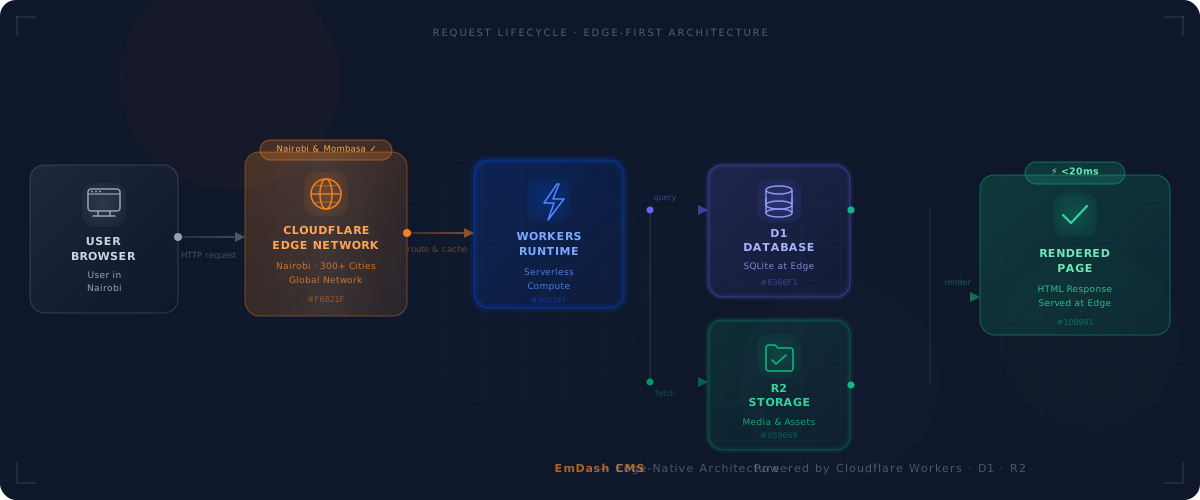
Imagine WordPress, but instead of running on a single shared hosting server in some data center in Germany, it runs on 300+ data centers worldwide — including Nairobi and Mombasa. Every time someone visits your website, the content is served from whichever data center is closest to them. A user in Kisumu gets served from Nairobi. A user in London gets served from London. A user in New York gets served from New York. No single point of failure, no slow overseas round trips.
The core philosophy behind EmDash is what developers call "edge-native." Everything — the server logic, the database queries, the media delivery — happens at the edge of the network, as close to the user as physically possible. This isn't a bolt-on CDN layer sitting in front of a traditional server. The CMS itself runs at the edge.
Where does EmDash fit in the CMS taxonomy? It's not purely headless like Contentful or Sanity, where you get an API and nothing else. It's not monolithic like WordPress, where the frontend and backend are tightly coupled. EmDash is a full-stack CMS — it gives you an admin dashboard for content editing, a database for storage, media management, AND a frontend rendering layer through Astro. But the entire stack is serverless and edge-deployed.
From my experience building over 85 projects on Freelancer.com, I've worked with almost every CMS you can name — WordPress, Joomla, Drupal, Strapi, Ghost, custom Laravel backends. The thing that makes EmDash different isn't any single feature. It's the architecture. Running your entire CMS on Cloudflare's infrastructure means you inherit all the performance, reliability, and cost benefits of that network without managing a single server.
EmDash at a Glance
- Framework: Astro
- Runtime: Cloudflare Workers
- Database: Cloudflare D1 (SQLite)
- Storage: Cloudflare R2
- Language: TypeScript
- License: Open Source
- Hosting Cost: Free tier available
- Source Code: GitHub
The Technology Stack Behind EmDash
Let's go deeper into each layer of EmDash's architecture. Understanding these pieces will help you appreciate why this CMS performs the way it does — and whether it's the right fit for your projects.
Astro Framework — Zero JavaScript by Default
Astro is the frontend framework powering EmDash, and it's one of the most exciting things happening in web development right now. According to the State of JavaScript 2023 survey, Astro has become one of the highest-satisfaction frameworks among developers, with over 40,000 GitHub stars since its launch.
What makes Astro special is its "islands architecture." By default, Astro ships zero client-side JavaScript. Your pages are rendered as pure HTML and CSS. Only when you explicitly need interactivity — say, a dropdown menu or a form — does Astro send JavaScript for just that component (the "island"). Everything else stays as lightweight HTML.
Why does this matter? According to Astro's 2023 Web Framework Performance Report, Astro sites load roughly 40% faster than equivalent React-based sites. Here in Kenya, where average mobile page load times on 3G connections can exceed 8-10 seconds, that difference is enormous. It's the difference between a user staying on your site and hitting the back button.
Astro also gives you flexibility — you can use it for static site generation (SSG), server-side rendering (SSR), or a hybrid of both. EmDash uses SSR through Cloudflare Workers, meaning pages are rendered on-demand at the edge rather than pre-built at deploy time.
Cloudflare Workers — Serverless Compute at the Edge
Cloudflare Workers is the serverless compute platform that runs EmDash's backend logic. Think of it as the engine room. When someone requests a page, a Worker picks up that request, queries the database, renders the page through Astro, and sends back the response — all within milliseconds.
How is this different from traditional hosting or even AWS Lambda? Two big ways. First, Workers run on Cloudflare's edge network across 300+ cities globally. There's no centralized server. The compute happens wherever the user is. Second, Per Cloudflare's Workers documentation, Workers have virtually zero cold starts because they use the V8 isolate model rather than spinning up containers. By contrast, AWS Lambda cold starts for Node.js functions can reach 200–500ms — a significant penalty for real users. Workers are ready almost instantly because they use the V8 JavaScript engine (the same one in Chrome) rather than spinning up entire container environments.
The free tier gives you 100,000 requests per day. For a small business website or blog, that's more than enough. You could run a perfectly functional CMS-powered website without paying a single shilling for compute.
Cloudflare D1 — SQLite at the Edge
Cloudflare D1 is EmDash's database layer. It's essentially SQLite running on Cloudflare's infrastructure, and it's replicated across their network for fast reads.
For a CMS, this is a smart architectural choice. Content management systems are overwhelmingly read-heavy — for every one time an editor publishes an article, that article might be read 10,000 times. SQLite is incredibly fast for reads, and having it distributed at the edge means database queries don't need to travel back to a central server.
The free tier offers 5 million rows read and 100,000 rows written per day. For context, even a busy blog with hundreds of posts and thousands of daily visitors would barely scratch that limit.
Cloudflare R2 — Object Storage Without Egress Fees
Media management is handled by Cloudflare R2, which is S3-compatible object storage. You upload images, PDFs, videos — anything — and R2 stores and serves them.
Here's the killer feature: zero egress fees. If you've ever used AWS S3, you know that storing files is cheap, but serving them to users gets expensive fast. Every time someone downloads an image, Amazon charges you for the bandwidth. R2 doesn't. You get 10 GB of free storage, and no matter how many times your images are downloaded, you pay nothing extra for the transfer.
For media-heavy Kenyan websites — think real estate listings with dozens of property photos, or e-commerce sites with product galleries — this eliminates what I call the "bandwidth tax" that makes running image-rich sites on traditional hosting so expensive.
TypeScript — Modern, Type-Safe Development
EmDash is written entirely in TypeScript rather than JavaScript. This means you get type checking, better IDE support, auto-completion, and fewer runtime bugs. If you're a developer who's been working with modern tools, TypeScript feels natural. If you're coming from WordPress's PHP world, it's a significant step up in developer experience.
All these pieces — Astro, Workers, D1, R2, TypeScript — compose together into a CMS that's fast, cheap to run, and pleasant to work with as a developer. It's a cohesive stack rather than a patchwork of unrelated services.
"The best CMS is the one your users never notice — because the content loads before they can blink."
Key Features of EmDash CMS
Now that you understand the technology stack, let's talk about what EmDash actually gives you as a CMS. Because at the end of the day, a CMS is only as good as its features for both content editors and developers.
1. Built-in Admin Dashboard
EmDash ships with a content editing interface that runs entirely on Workers. You log in, create content, manage your site — all through a web-based dashboard. This is a big deal because many modern CMS alternatives (especially headless ones) give you an API and expect you to build your own admin panel. With EmDash, you get one out of the box.
Compare this to Contentful or Sanity, where the admin interface is hosted on their servers and you pay for it. Or Strapi, where you need to set up and host the admin panel yourself on a Node.js server.
2. Flexible Content Modeling
You can define custom content types with flexible schemas. Blog posts, product pages, team member profiles, FAQ sections — whatever your site needs. This is similar to what you'd get with WordPress Custom Post Types, but defined in TypeScript code rather than through PHP plugins.
3. Media Management via R2
Upload, organize, and serve images and files directly through the admin panel. Everything gets stored in Cloudflare R2, meaning your media is served globally with zero egress costs. No more worrying about image-heavy pages eating into your hosting bandwidth allocation.
4. API Endpoints
EmDash auto-generates API endpoints for your content, which means you can use it as a headless CMS too. Build your frontend in React, Vue, Svelte, or whatever you prefer, and pull content from EmDash's API. Or use the built-in Astro frontend. Your choice.
5. Authentication and Access Control
The admin panel comes with built-in authentication. You're not bolting on a third-party auth service or rolling your own login system. This is basic but essential — and something that trips up a lot of developers building on headless CMS platforms.
6. SEO-Friendly Output
Because Astro renders pages as clean HTML with zero unnecessary JavaScript, your Core Web Vitals scores are excellent out of the box. Google's page experience signals — Largest Contentful Paint, First Input Delay, Cumulative Layout Shift — all benefit from Astro's HTML-first approach. You don't need to install five SEO plugins like you would with WordPress to get a good baseline.
7. Markdown and MDX Support
Content authors can write in Markdown or MDX (Markdown with embedded components). For developers and technical writers, this is a much more pleasant authoring experience than wrestling with WordPress's block editor. For non-technical content editors, the admin dashboard provides a more visual interface.
8. Edge Caching
Since EmDash runs on Cloudflare, you automatically get access to Cloudflare's CDN caching layer. Frequently accessed pages can be cached at edge locations worldwide, meaning repeat visitors get near-instant load times. This isn't something you configure separately — it's baked into the platform's architecture.
Trust me on this one — after years of configuring W3 Total Cache, WP Super Cache, and LiteSpeed Cache on WordPress sites to squeeze out performance, having caching be an inherent part of the CMS architecture rather than an afterthought is refreshing.
EmDash vs WordPress vs Headless CMS: How Does It Compare?
Alright, let's get into the comparison that everyone wants to see. How does this EmDash Cloudflare CMS stack up against the platforms you already know? If you've been searching for an emdash cms review, this section is what you're looking for.
EmDash vs WordPress — The Core Comparison
WordPress powers roughly 43% of all websites globally, according to W3Techs. It's the incumbent. It's battle-tested. And let me be honest with you — for many Kenyan businesses, WordPress is still a perfectly good choice. I've built dozens of WordPress sites and I still recommend it regularly.
But WordPress has real weaknesses that EmDash addresses:
- Performance: A typical WordPress site requires PHP execution, MySQL queries, and often multiple plugin loads on every page request. Even with caching, you're looking at 1-3 second load times on good hosting. EmDash serves pre-rendered HTML from the nearest edge location in under 100ms.
- Hosting Cost: Decent WordPress hosting in Kenya runs KES 5,000-15,000 per year minimum. You should never cheap out on hosting — a slow website costs you more in lost customers than the money you saved. EmDash can run on Cloudflare's free tier.
- Security: WordPress is the most targeted CMS on the internet. Outdated plugins, brute force attacks, SQL injection — I've cleaned up hacked WordPress sites more times than I can count. EmDash's serverless architecture has a much smaller attack surface.
- Developer Experience: WordPress runs on PHP. EmDash runs on TypeScript. For modern developers, TypeScript offers better tooling, type safety, and a more enjoyable coding experience.
Where WordPress still wins: its ecosystem. 60,000+ plugins, thousands of themes, a massive community, and content editors who already know how to use it. EmDash can't match that — not yet, and honestly, maybe not ever.
EmDash vs Strapi / Ghost (Self-Hosted Headless)
Strapi and Ghost are popular self-hosted headless CMS options. They're open-source, they give you an API, and they're more modern than WordPress.
The key difference? Both require a Node.js server. You need to provision hosting, manage the server, handle updates, and pay for compute. EmDash eliminates all of that by running on Cloudflare Workers. No server to manage, no monthly hosting bill (on the free tier), no SSH sessions to debug crashed processes.
I once spent three sleepless nights debugging an M-Pesa callback integration for a client's e-commerce site. The issue turned out to be a single missing slash in the callback URL. That experience taught me that the fewer moving parts in your infrastructure, the fewer things can go wrong at 2 AM.
EmDash vs Contentful / Sanity (SaaS Headless)
Contentful and Sanity are excellent SaaS headless CMS platforms. They handle hosting, scaling, and the admin interface for you. But they come with costs that add up quickly — Contentful's paid plans start at around $300/month (verify current rates on their pricing page), and you're locked into their platform.
EmDash gives you similar capabilities (API endpoints, content modeling, media management) but you own and control everything. Your content lives in your Cloudflare D1 database, not on someone else's servers. And your hosting costs can be a fraction of what you'd pay for SaaS CMS plans.
The trade-off? Contentful and Sanity have polished, enterprise-grade admin interfaces with collaboration features, workflows, and integrations that EmDash simply doesn't have yet. If you're a large organization with a content team of 10+ people, EmDash isn't ready for you.
Curious about the full cost picture for building a website in Kenya? Check out our 2026 pricing guide for detailed breakdowns.
EmDash vs WordPress vs Headless CMS
| Feature | Recommended EmDash | WordPress | Strapi / Ghost | Contentful / Sanity |
|---|---|---|---|---|
| Hosting Cost | Free tier | KES 5k–15k/yr | Server required | $300+/mo |
| Performance | ||||
| Developer UX | TypeScript + Astro | PHP + WP API | Node.js | REST / GraphQL |
| Content Editor UX | Basic | |||
| Plugin Ecosystem | 60,000+ | Growing | Limited | |
| Community Size | Early stage | |||
| Learning Curve | Dev-friendly | Easy for all | Moderate | Moderate |
| Africa / Latency Fit |
Pricing data as of April 2026. All figures are approximate and subject to change.
Not Sure Which CMS Is Right for Your Kenyan Business?
The choice depends on your team's technical skills, budget, and content needs. If you have developers comfortable with TypeScript and want near-zero hosting costs, EmDash is worth exploring. If you need a proven ecosystem with thousands of plugins, WordPress remains a strong choice.
Need help deciding? Talk to our team at Quest — we'll give you an honest recommendation based on your specific situation.
Why EmDash Matters for Kenyan and African Developers
This is where things get really interesting for us here in Kenya. Let me walk you through why an edge-first CMS built on Cloudflare's stack has specific, tangible benefits for the East African market.
1. Cloudflare's Nairobi and Mombasa Data Centers
According to Cloudflare's network page, they operate data centers in both Nairobi and Mombasa — plus dozens more across Africa in cities like Lagos, Johannesburg, Cape Town, Dar es Salaam, and Kigali. When your CMS runs on Cloudflare Workers, your Kenyan users are hitting a server that's physically in Kenya. Not in Amsterdam. Not in Virginia. Right here.
The difference in latency is dramatic. A traditional WordPress site hosted on a European shared server might take 300-500ms just for the initial server response before any content starts loading. An EmDash site served from Nairobi's edge location? Typically under 20ms for Time to First Byte — consistent with Cloudflare's published network latency data for African PoPs. That's not a marginal improvement — it's an order of magnitude faster.
2. Near-Zero Hosting Costs
Let me be real about the Kenyan business environment. Most SMEs here are operating on tight budgets. When I co-founded Quest in 2014 from a small office on the 4th floor of Muguku Business Center in Kikuyu, our first client paid us KES 15,000 for a full website — we thought we had made it. I understand budget constraints intimately.
Cloudflare Workers gives you 100,000 requests per day for free. D1 gives you 5 million row reads per day for free. R2 gives you 10 GB of storage for free. For a small business website, a blog, or a portfolio site, you could legitimately run EmDash at zero hosting cost. Zero. That's transformative for a Kenyan startup that's choosing between paying for hosting and paying for inventory.
3. Zero Egress Fees on Media
If you run a media-heavy website — real estate listings, e-commerce product photos, a photography portfolio — bandwidth costs on traditional hosting can be brutal. AWS S3 charges you every time someone downloads an image. Even some Kenyan hosting providers charge extra when you exceed bandwidth limits.
R2's zero egress model eliminates this entirely. Upload your images, serve them to millions of visitors, and pay nothing for the transfer. For the Kenyan market, where mobile users are browsing on data plans and every kilobyte matters, this is significant.
4. TypeScript Skills Alignment
Kenya's tech ecosystem is growing rapidly. According to the Communications Authority of Kenya, we have over 17 million internet users with smartphone penetration exceeding 60%. The developer community is expanding to match.
TypeScript is one of the most in-demand skills in the global job market. Young Kenyan developers learning TypeScript and modern frameworks like Astro are building skills that transfer directly to international freelancing and remote work. EmDash lets these developers use their modern skills to build CMS-powered sites rather than having to learn legacy PHP patterns.
5. Open-Source Contribution Opportunities
EmDash being open-source means Kenyan developers can contribute to the project, file issues, submit pull requests, and build their GitHub profiles. I've seen this countless times — contributing to open-source projects is one of the best ways for developers in emerging markets to build credibility and land international opportunities.
6. No Server Management Required
Serverless architecture means no Linux servers to patch, no Nginx configurations to debug, no MySQL databases to optimize. For small teams without dedicated DevOps engineers — which describes most Kenyan web agencies, including ours in the early days — this removes an entire category of operational headaches.
I once fixed a client's crashed production server from a hotel room in Lilongwe, Malawi, using hotel Wi-Fi that kept dropping every five minutes. If that site had been running on a serverless platform, there would have been nothing to crash in the first place.
"Africa's next generation of websites won't be built on servers in Virginia — they'll run on edge networks with data centers in Nairobi, Lagos, and Cape Town."
Stay Ahead of the Curve
Get weekly insights on web development tools, CMS trends, and digital strategies tailored for Kenyan businesses — delivered straight to your inbox.
Getting Started with EmDash: A Quick Setup Overview
One of EmDash's biggest selling points is how quickly you can go from zero to a running CMS. I won't write a full tutorial here — that deserves its own post — but let me walk you through the high-level steps so you can see just how accessible this is.
Prerequisites
You'll need three things: Node.js installed on your machine, a Cloudflare account (the free tier works perfectly), and the Wrangler CLI tool (Cloudflare's command-line interface for managing Workers, D1, and R2).
If you've ever set up a WordPress site, you know the drill: install PHP, install MySQL, configure Apache or Nginx, set up a virtual host, download WordPress, run the installer, configure wp-config.php... it's a process. With EmDash, there's none of that. No PHP. No MySQL server. No Apache. No cPanel.
The Setup Process
Here's the general flow: clone the EmDash repository from GitHub, install the dependencies, create your D1 database and R2 storage bucket through Wrangler, run the development server locally to test, and then deploy to Cloudflare Workers when you're ready. The entire process can realistically be done in under 15 minutes if you already have Node.js and a Cloudflare account.
# Clone the EmDash repository
git clone https://github.com/emdash-cms/emdash.git
cd emdash

# Install dependencies
npm install

# Create your Cloudflare D1 database
npx wrangler d1 create emdash-db

# Create your R2 storage bucket
npx wrangler r2 bucket create emdash-media

# Run locally for development
npm run dev

# Deploy to Cloudflare Workers
npm run deploy
After deploying, you access the admin dashboard through your Workers URL, create your first content types, and start publishing. That's it. No server provisioning, no database server installation, no SSL certificate configuration (Cloudflare handles HTTPS automatically).
Compare that to a typical WordPress setup where you're dealing with choosing a hosting provider, configuring PHP versions, managing database credentials, installing SSL certificates, and hoping your shared hosting neighbor isn't running a resource-hungry script that slows down your site. The simplicity of EmDash's deployment is genuinely impressive.
Note: Always check the official EmDash repository on GitHub for the latest setup instructions — the CLI commands may be updated as the project evolves.
One caveat: you do need to be comfortable with the command line and basic developer tools. This isn't a one-click install from a hosting provider's dashboard. EmDash is built for developers, and the setup reflects that.
EmDash Use Cases: When Should You Choose It?
Not every tool is right for every job. I've learned this the hard way over 14 years — sometimes the best advice is telling a client what NOT to use. So let me be straightforward about when EmDash makes sense and when it doesn't.
Ideal Use Cases for EmDash
Developer portfolios and personal blogs. If you're a Kenyan developer wanting to showcase your work, EmDash is almost perfect. Zero hosting cost, blazing-fast performance, and you get to work with modern tools that look great on your CV. Plus, you can customize every aspect of the frontend since it's built on Astro.
Small business brochure websites. A restaurant in Nairobi, a law firm in Mombasa, a consulting company in Eldoret — if you need a professional website with a few pages, a blog, and a contact form, EmDash handles this beautifully. The performance alone gives your business a competitive edge — your site loads faster than your competitor's WordPress site, and Google notices.
Content-driven marketing sites. Blogs, resource hubs, documentation sites, knowledge bases. EmDash's content modeling and Astro's content-first approach make these projects straightforward. The SEO benefits of fast, clean HTML output are substantial.
Headless API backend for Jamstack projects. If you're building a frontend in React, Next.js, or Svelte and need a self-hosted content API, EmDash can serve as your backend. You get the content management interface without paying for a SaaS platform.
Prototyping and MVPs. Need to spin up a CMS-backed site quickly to test a business idea? EmDash's fast setup and zero cost make it ideal for minimum viable products. Build it, test it with real users, and decide whether to invest more — all without spending money on infrastructure.
When NOT to Use EmDash
Let me be honest with you about the limitations.
Large e-commerce stores. If you're building an online shop with hundreds of products, payment processing, inventory management, and order fulfillment, you need a purpose-built e-commerce platform. Shopify, WooCommerce, or a custom web development solution would serve you better. EmDash doesn't have shopping cart functionality, payment gateway integrations, or order management built in.
Sites requiring extensive plugin ecosystems. WordPress's 60,000+ plugins exist because people need them — contact forms, booking systems, membership areas, LMS functionality, social media integrations. EmDash has no plugin ecosystem. Everything beyond the core features requires custom development.
Teams with zero technical capacity. If nobody on your team can work with TypeScript, the command line, or Cloudflare's dashboard, EmDash will be frustrating. WordPress with a managed hosting provider is a better fit for non-technical teams.
Complex editorial workflows. If you have a content team with writers, editors, reviewers, and publishers who need approval chains, scheduling, and collaboration tools, EmDash isn't there yet. Platforms like WordPress with editorial plugins, or SaaS CMS platforms like Contentful, handle these workflows much better.
Projects requiring complex user roles. Multi-tenant applications, membership sites with tiered access, or platforms with dozens of different user permission levels — these require more sophisticated auth and access control than EmDash currently offers.
The Future of Edge-First CMS Platforms
Let's zoom out and talk about where the CMS industry is headed, because EmDash isn't an isolated experiment — it's part of a much larger shift.
The CMS evolution has followed a clear trajectory: monolithic (WordPress, Drupal) → headless (Strapi, Contentful) → composable and edge-native (EmDash and others). Each generation addressed limitations of the previous one. Monolithic CMS platforms coupled frontend and backend too tightly. Headless CMS platforms decoupled them but still ran on centralized servers. Edge-native platforms distribute everything — compute, data, media — across the global network.
Cloudflare's ecosystem has quietly become a viable full-stack platform. Workers for compute. D1 for databases. R2 for storage. KV for key-value data. Queues for background processing. Pages for static hosting. Durable Objects for stateful applications. You can build entire applications without leaving Cloudflare's ecosystem, and EmDash proves this for the CMS category.
According to Cloudflare's Workers architecture documentation, they continue to expand their edge infrastructure globally, including across Africa. As more data centers come online across the continent, edge-native tools like EmDash will deliver increasingly better experiences for African users.
During a trip to India, I attended a tech meetup in Bangalore and was blown away by how developers there approached scaling problems. I sat next to a senior engineer from Flipkart who casually mentioned their system handled 10 million requests per minute during sales. That conversation changed how I think about architecture. Edge-native platforms like EmDash embody that same thinking — design for scale from the start, distribute everything, and let the infrastructure handle the hard parts.
Astro's growth trajectory is another positive signal. The framework has one of the most active and welcoming communities in the JavaScript ecosystem, with regular releases and a clear roadmap. When you build on EmDash, you're building on a frontend framework that's gaining momentum, not losing it. That matters for long-term viability.
I also see this trend benefiting African developers specifically. As edge infrastructure expands across the continent, the performance gap between "African-hosted" and "globally-hosted" websites will shrink dramatically. Kenyan developers building with edge-native tools today are positioning themselves ahead of this curve.
Want to stay current with where web design is heading in 2026? We track these trends closely at Quest because they directly affect the recommendations we make to our clients.
Frequently Asked Questions About EmDash CMS
Conclusion: Is EmDash CMS Right for Your Next Project?
Let me wrap this up with some honest takeaways.
EmDash is a genuinely promising open-source CMS that brings modern web development practices to content management. If you've been wondering what is EmDash CMS and whether it's worth your attention — yes, it absolutely is. The combination of TypeScript, Astro's blazing-fast rendering, and Cloudflare's edge infrastructure creates something that's more than the sum of its parts.
For Kenyan developers specifically, EmDash offers advantages that are hard to ignore: content served from local data centers in Nairobi and Mombasa, hosting costs that can be literally zero, no servers to manage, and a modern developer experience built on skills that are in high demand globally. If you're a developer who knows TypeScript (or wants to learn), EmDash is worth spinning up this weekend just to see what's possible.
For Kenyan business owners, the picture is more nuanced. If you have a developer on your team or work with a web agency (like us at Quest), EmDash could power your next website at a fraction of the cost of traditional hosting while delivering better performance. If you don't have technical resources, WordPress with good hosting remains the safer bet — for now.
I want to be transparent: EmDash is still a young project. It doesn't have WordPress's 20-year ecosystem, Contentful's enterprise features, or Strapi's mature plugin system. Early adopters will benefit most — you'll get cutting-edge performance and cost savings, but you might also encounter rough edges and limited documentation. That's the trade-off with any new technology.
At Quest, we're committed to evaluating and adopting the best tools for Kenyan businesses, whether that's WordPress, Laravel, a custom TypeScript solution, or something entirely new like EmDash. The CMS landscape is shifting, and we believe the future runs at the edge. The question isn't whether edge-first platforms will become mainstream — it's when.
My biggest freelancing project was a $29,000 Laravel platform refactor for a client in Sweden, and it taught me that the best technology decisions aren't about chasing the newest tool — they're about matching the right tool to the right problem. EmDash is an excellent tool. Whether it's the right one for your specific project depends on your needs, your team, and your goals.
And that's what we're here to help you figure out.
Building a Website for Your Kenyan Business?
Whether you choose EmDash, WordPress, or a custom solution, Quest designs high-performance websites tailored to the East African market. We've completed over 85 projects and we'll give you an honest recommendation based on your specific needs — not just what's trendy.
Get a free consultation today or explore our web design services.